Showing posts with label Free Softwares. Show all posts

01 December 2008

Software Review: PhotoResizer 3.0


This is the post to continue my last post about how to resize photo on Vista. But in here, I'll be focus on Photo Resizer 3.0 application.

After download PhotoResize400.exe, and place it somewhere that easy to access, you can start drag and drop JPG files or even folder to photoResize icon. By default the application will be resize you picture to 400 pixels and preserves original aspect ratio, but if you want to have another size of picture, you can simply change the program name. Ex: if you want to resize to 1024 pixels photo, you can rename the program that you downloaded into photoresize1024.exe, and when you drag and drop your photos to the icon, your photo will automatically resized to 1024 pixels. If you want to have manual control both width and height of the output image, rename the application to PhotoResizeWxH.exe, where W is the requested width and H is the requested height.
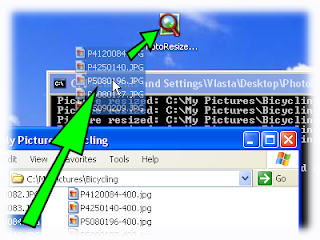


Based on the program website, they tell us that "the tool is using high quality resizing method, where colour of each pixel is a weighted average of all covered pixels from the original image. Linear interpolation is used when zooming in". They also claim that "The algorithm is optimized to work with gamma-corrected pictures".
Based on my trial, yes, the program resize picture very fast and it gives my photo more details compared to resizing photo using Microsoft Outlook. Good point..

If you find that drag and drop is giving to much harsh for you, then try using this program with open with. First select where you save the program. After you found it, then click Ok. Remember not tick "Always use this program to open this kind of file", otherwise next time when you click your picture, instead of display, your computer will resize it.


There is a lot of other tweaks you can do with this program, for example resize the dpi, specify another folder to save, overwrite original file, etc. You can see the details from their website. It is very simple and good guide.

The only bug I found until now is that you can not resize to many pictures in a row. Maybe 20 or 30 will do. But when I tried 60 pictures, it didn't work. Also this program only work with JPEG files. For me it is adequate, because I rarely use another picture format.

Oh, and this program is absolutely free. Of course you can donate to the creator of this program, if you find that this program is useful for you :)

26 November 2008

How to Bulk Resize Photos on Vista

It is very easy to resize bulk photos on Windows XP. You just need to install an add-on called PowerToys Image Resizer. It is free and created by Microsoft. Later after install the program, you just need to right click on the pictures and then choose the new picture size.

But, how if you need to resize photos on Vista? There is no add-on (from Microsoft) until now that suitable and easy to install like PowerToys for Vista.

In this post, I'll share how I resize my pictures on my Vista. It is done by two way. You can pick either one that suit to you. First way to do this is by using resources that already installed on Windows: Microsoft Outlook and Windows Explorer.

  1. Open photos folder, and select the photo you want to resize.
  2. Right click, send to and click on mail recipients.
  3. New window will pop-up, ask you the size of the photo.
  4. Afterwards, you can click on single photo and do save as or do select all (ctrl+A) then right click and choose copy
  5. Create a new folder on your windows explorer, and do paste (ctrl+V). It is simple and fast. You don't need to send the email, just discard it after you finish.

The second way is done by using a program called Picture Resizer 3.0. This is very simple yet powerful program. All you have to do is download this PhotoResize400.exe and save it somewhere that easy for you to access (ex. on your desktop). Then you just need to drag and drop JPG files or even folders to PhotoResize icon. This tool then will resize you images and save it to original folder. Name of the new pictures will be based on the original name, only the program will alter it with number indicates the size of the picture.


The advantages using this program than using Outlook is, while resizing the picture, this program will also do gamma correction. It also allow you to pick the size you want, even it is not an usual size (if you using outlook, you have to follow what is provided by the program). If you want to read more detail on how to use this program, I'll post more detail information on separate post.

Pic taken from: http://www.rw-designer.com/picture-resize

Software Review: TweakUI


Not exactly a complete 'software' is TweakUI. This little program from Microsoft helps you to 'gives access to system settings that are not exposed in the Windows XP default user interface'. And it was actually nice enough to help me to hide an unwated control panel extension icon, something that I couldn't do easily if I had to edit Windows registry directly.

TweakUI allows you to change Windows registry without even have any knowledge on how registry works by simply provide User Interface to change the values. There are many options available, so explore them by yourself. All you need is to open TweakUI, change the value you want and if the results are undesirable, you can change it again without worry having destroyed your Windows settings. Friendly, huh? ^^

You can download it from Microsoft website (duh...it's pretty obvious....). And yeah, the version I listed here only works for XP, if you know anything about TweakUI for Vista, let me know.

Score: 7/10

30 October 2008

Maximising Ccleaner

Installing Ccleaner is a piece of cake for you that used to Windows program. But I still decide to do some review, because I believe that lots of people still have not maximize potential of this program yet.

Installation process:
  1. Download Ccleaner from here or here for the slim edition. This slim version does not include Yahoo toolbar (sponsor for this program) and the result is a program less than 1MB size. Marvellous for people with dial up connection.
    The latest version that used in this guide is 2.13.720.
  2. You will be faced by several windows when you run the installation: language selection, welcome page, licence agreement, and choose install location. For these steps, just accept all their default settings, and click next / I agree.
  3. The last step before installation is install option windows. In here, I recommend you to unselect add menu to recycle bin and automatically update option. Why? Because in my experience, adding Ccleaner to recycle bin will be useless as there is already a shortcut in desktop. It will only add more loads to right click menu list, and sometimes it slow down the whole right click process. Also even this Ccleaner is small in size, but it has a frequent update times. So if you don’t want to bugged with the question “new version is available, update now?”, unselect this option! Yahoo toolbar is optional (it will make you able to run ccleaner from your browser), but I feel will not use it, and choose to unselect it.


    Install Options

Running Ccleaner:
  1. After installation finish, Ccleaner windows will be closed automatically. To run this program, double click on Ccleaner shortcut at desktop.
  2. You will be suprised as the interface is so damn simple, but still elegant. It has four main menus on the right: Cleaner, Registry, Tools and Option. Each option will have smaller submenu. For our first step, click Cleaner menu (it is default clicked when you run Ccleaner)

    Photobucket


  3. Click analyse to see how big useless files that you been kept inside the computer. You can also press run cleaner to do all cleaning straightaway. Do the same thing for applications. For computer that has not been cleaned for long time, this process will take some time. You can just leave it for a piece of cake.


    Windows File Cleaner


    As you can see... I can free about 1Gb from my hard drive :)

  4. Click registry menu (on the right side menu), click scan for issues (yes it will take time to finish, especially if your Windows’ registry is a mess).

    Registry Cleaner


    Press fix selected issues after scan process finished. A new windows will pop up, asking wether you want to backup your registry.

    Backup Question


    It is a good behaviour to have a backup though. Just create a new folder to save your backup, and next time you run Ccleaner, it will remind where the latest folder was. Click fix all selected issues, click yes, and then close.

    Photobucket


  5. In the tools menu (on the right side menu), you will find two sub menu: uninstall and start-up. Uninstall works very simple, just like Windows' add remove program, only it will load your entire programs list much more quickly.

    Uninstall

    Choose program you want to uninstall, afterwards, don't forget to clean up you registry and file, to make sure your program is 100% removed.
  6. In start-up sub menu (inside tools menu), you will find a list of start-up file that loads by windows in boot up time. If you feel that your start-up is very slow, maybe you need to check this list. Example of useless start-up: Google update, Winamp agent, Messenger program, Quicktime and Apple related.

    Startup Editor

    Don't delete any start-up list that you don't understand. First copy the program name, and search it on Google. If it is indeed just useless app, disable first, reboot your windows, and see wether it gives you any error. If it seems fine, than you can delete if it really necessary. In addition, sometimes if you get virus that block antivirus program on your computer, disable the virus from start-up list will help to unblock the antivirus program.
  7. Option menu (on the right side menu), you will get settings, cookies, include, exclude, advanced and about submenu. In setting submenu, you will find secure delete option.

    Settings


    If you are paranoid (or maybe you are a secret agent) that don't want any trace left in your computer, you can select this secure delete option. Of course it will slow deletion process, but it worthless if you really want to get rid of your trace. The higher passes deletion step, the slower the process, and less chance to get your trace back.
    The rest of menu is not very important, so I leave it for you to explore :)

Ok, that’s all you need to know for maximize this program potential. I hope by using a lot of picture it will help you to go through the steps more quicker. If you have something more from this program or any trouble, let me know, drop a comment here. Happy trying ^^

28 October 2008

Software Review: Ccleaner


Do you know when you uninstall a program in Windows, sometimes it is not completely removed? There are possibilities that registry of your program still remaining, and by the time you do a lot of install and un-installation, your registry with be filled with a lot of useless things. This would decrease your drive space and computer performance, slow your windows to death.

To overcome this, you can use a program that do cleaning and fixing your registry. Program like registry booster, registry mechanic, and registry editor maybe not strange anymore for several people. But to use these programs usually we have to pay some amount of money.

After do some searching on Google, then I found this program, Ccleaner (Crap Cleaner). As it's name, the main function of this program is to clean all craps inside your computer, not only in registry but also will clean temporary files, recycle bin, browsing cookies, internet history, document history, and many more.

Another cool things from this program:
  1. It has a backup option before you do registry cleaner. This will be useful if you accidentally erase important registry that used by your system. (I used this program for about 1 year, but never found any error caused by cleaning the registry)
  2. Has a built in startup editor so you can disable / remove any startup file that you don’t need such as yahoo messenger program, Adobe update tool, etc. It will significantly increase your boot up time if you do this.
  3. Has uninstall program option. I don't know yet what the differences between this and Windows' add remove program in term of performance. But if you talk about speed, this program will load list of your programs faster than Windows' add remove program did.
  4. You will notice that when you do clean up it will also wipe out your trace on the computer (ex case: if you cheat on your girl/boy friend, you can wipe all your track using this program easily before they use your computer :p).

Oh, and the best thing from this program is it free to use. However, the developer will be very pleasure to receive any donation. To download this program click here.

In the next thread, I'll show you how to install and run this program.

20 October 2008

Software Review: Orbit Downloader

For many months, I had been bugged for lack of decent download managers. Back then I used Internet Download Managers (shareware) but it lacked any real features. The only it's good at was downloading files, nothing more. Sure IDM up until now still has popularity among download managers but slowly, mainly because it's shareware, people started to move to freeware yet powerful download manager. Two most common download managers nowadays are Free Download Manager (FDM) and Orbit Downloader. However, as for this post, I will only review Orbit, but maybe I'll put review also for FDM for comparison...

When this thread's posted, the most recent version is 2.7.7. As another download managers , Orbit also offers enhanced speed when you use it to download anything. Orbit is also able to integrate itself into many popular browsers such as Firefox and IE. Overall, general features (scheduler, download management etc) on most download managers are available on Orbit. I, however, really like Orbit's ability to directly download YouTube Video. Before this, I used free services on internet to get me to video's direct link on YouTube server, and thus adding extra steps. With Orbit, there's no need to....

Also, as I said, being free software means advantage. Someday, sooner or later, I believe people won't even take a look at a shareware download managers like IDM or Reget, for FDM and Orbit are good enough to cover everything you need to download files.

Score: 10/10

19 October 2008

Software Review: Metapad


metapad is one of my most used programs in Windows environment. It's actually a simple text editor. Unlike notepad, metapad offers rich user interface and easy to configure. It's main strength lies on customizable shortcuts and extra settings that can't be found on notepad, Windows' default text editor. Basically, metapad is an enhanced version of notepad.

I mainly use metapad to write FAQs/walkthoughs and blog contents offline before publishing. Why so? Because its transparent mode. It allows me to quick edit my files without having to alt-tab between windows since another windows hidden behind can be seen easily. Very handy feature to have sometimes.

metapad loads so damn fast on my P3 machine, so don't complain it won't work on your CPU. It consumes very little resources, even when 2mb files loaded in it. It's size is small as well, and there's no need to install the program since liquidninja website only displays zipped file that containes metapad executables.

Overall, this is great software for simple writing. I suggest you to replace notepad with this tool.

Score: 10/10

07 October 2008

Software Review: Firefox

The Firefox Web Browser is the faster, more secure, and fully customizable way to surf the web.

I am running poll about Firefox now. And as far as I can see, people is interested more on Firefox than IE, adding more reason for me to write for Firefox review. Here we go....

Firefox, a must have software on our PC. If you don't have it, go hang yourself on that corner. :) As for the most current version, as this article is written, is 3.0.3 version. Now, where shall I start? Whatever... I guess I'll start with 'Top 3 reasons to use Firefox", rite?

1. Firefox is faster than any browser available nowadays. It loads fast and efficient, making it's extremely popular among browsers nowadays. The only competitor on this area is Google's Chrome.
2. Firefox is customizable. You can add plugins, skins/themes or even develop them yourself.
3. Firefox's goddamn interfaces is user-friendly. Multitab is a handy tool as well.
4. .... I only promised 3 list, didn't I?

....

Hmm, I could make longer list but I think you have to dig for them yourself. Once you attached to it, you won't even go back to IE, if you were IE user. Chrome is a better option, just in case you want to use alternate browser.

If you're concerned about its security, Firefox is pretty secure on its own. There are also many plugins you can add to it to enhance its security measurement. NoScript and Adblock Plus are just a prime examples. Go take a look on Firefox website, you'd be surprised with lots of excellent add-ons to help you costumize your Firefox.

Firefox native functions are great too, this but no limited to One-Click Bookmarking, Session Restore and Full Zoom. If you are a type of person that loves to bookmark websites, Firefox's bookmark function should serve you well. Session Restore helps in case of accidental crashes, I got saved many times by it ( do note that I'm an 'expert' destroyer... >_>).

But wait. As usual as any major programs have, Firefox is bad on memory management. :P I left it overnight, leaving 3 tabs open, and on the next morning Firefox ended up using 178 MB of my RAM. Duh... If they're able to fix it, I think it will be the greatest browser, soon. This is the only negative value Firefox hasBUT since it's negative one, I can't give it 10 score... (poor Firefox...)

Score: 9/10

Related links:

http://eternalblackzero.blogspot.com/2008/09/f5-for-refresh-alt-f4-for-win.html

http://eternalblackzero.blogspot.com/2008/09/did-you-knowblogs-common-statistics.html


http://eternalblackzero.blogspot.com/2008/09/fact-behind-firefox-pipelining-trick.html

http://eternalblackzero.blogspot.com/2008/09/firefox-addon-firegestures.html

http://eternalblackzero.blogspot.com/2008/09/use-speed-dial-addon-to-bookmark.html

http://eternalblackzero.blogspot.com/2008/08/pro-tip-use-foxmarks-on-your-firefox.html

http://eternalblackzero.blogspot.com/2008/07/internet-explorer-8-vs-firefox-3.html


http://eternalblackzero.blogspot.com/2008/06/pro-tip-how-to-manage-your-firefox.html

...how come that I've written so many articles related to Firefox but just reviewed the main software today? Silly me... >_>

29 September 2008

Software Review: Meebo


My first software review that doesn't involve the said software installation, since this meebo is web-based chatting software. :P Link to meebo has been included too on My Links section, since long time ago...

Well duh... What should I say here?

Meebo is another (free) web-based multi-protocol instant messengers program. If you register an account there, meebo allows you to log in to multiple Instant Messenger addresses, presumably if you have two different accounts, at once. The web is loaded at lightning speed on my 128 kbps connection, and since mine is a crappy one, I don't think yours have difficulties in loading it.

This service is very useful if you don't have IMs installed on your computer, for some reason. All you need is internet connection and browser. Mozilla and IE are compatible with meebo, and probably Google's Chrome as well.

The downside of this service is, you can't pull your IM service to its fullest extent. File sharing and transfer, for example, doesn't work in this service. But since meebo is designed for simplicity, it's not a great concern. But it's well worth it if meebo starts to improve this weakness.

Score: 9/10

My recommendation? Give it a try. ;)

28 September 2008

Software Review: VNC.


Ah, one of my favorite tool to manage my network.

As a network administrator for 30 or so clients, I need to make sure I'm able to maintain all of my clients. Typically, I used old fashioned 'door to door' approach whenever my clients need me. However my time was too much consumed on walking to destination, since the clients are scattered all over of this building (2 floors). The usual requests were questions about why certain things aren't working as before e.g 'My internet conn is broken!' 'I can't save my word file.'. These can be done from one spot, if I could remote their computers.

A quick Google search linked me to VNC website. That site offered two kind of remote softwares, both under one brand, VNC. The commercial version has several advantages but eh, I don't give a damn to pay for a software so I sort it out and made my way to free version download page.

You need to install it on both computers. Make sure you disable any firewalls active or open specific ports (5800 and 5900) on remote computer. Once VNC is up and running on remote computer, you can control it anytime from your computer. To connect, just type destination computer's name on VNC viewer and press ok. Typically, you don't need to modify anything except passwords on remote computer. The initial configurations are all done automatically by its installer.

Score: 9/10

And there's no need for me to walk around just to solve small matters now! :D

22 September 2008

Software Review: uTorrent.


Like its name implies, uTorrent is a torrent downloaded program. It is free, lightweight and easy to use. There is no advertisement displayed there as well.

The main menu is pretty straightforward. You can see the downloaded, completed, pending torrents on the right side, with speed and size of the torrent displayed there. Below it is extra information available for each parts of the torrents' progress. uTorrent allows you to manage your download and upload speed as well making this feature my favorite, ever. This allows us to control bandwidth spend to process torrent downloads. When you're using slower connection like mine, you'd use this one often... heheh. This uTorrent comes with torrent download scheduler too. Pretty handy tool to have on torrent program.

If you are concerned about your security while seeding or downloading torrent, uTorrent gives you an option to randomize your used port. Although this isn't that important since nowadays, there's no known exploit on uTorrent. I myself have used this software for a long time, and have never had myself attacked because I forward port 3128 for uTorrent. Lastly, if you would like to make torrent file, uTorrent can make one for you too!

All in all, this is great software. I can safely give this 9/10 as its final score in this review.

21 September 2008

Software Review: nLite.


Like I said yesterday, I will feature nLite review here. :P

Taken from its website: 'nLite is a tool for pre-installation Windows configuration and component removal at your choice.'

Like its description, we can use nLite to make bootable image that contains our own configuration. For example, on my case, I created image that contains SATA driver for my new laptop Presario V3000.

The creation process is fairly simple and fast. You need to prepare your drivers/configs/Service Packs/twaks first, and then extract your XP CD contents onto your drive. After that, you inject drivers, modify XP initial configurations etc and make image from that settings. Image created then can be burned onto CD.

nLite supports XP and and 2003. Also, you need to install .NET Framework 2.0 first as a prerequisite to run nLite. The installation file of nLite can be download freely, and also very small in size.

But, as useful as it is, nLite can't be used to tweak Linux environment.... Maybe in the future, eh?

Score: 8/10

15 September 2008

New Link Has Been Added.

It's for Orbit Downloader. I think I'll put its review here soon. For now, enjoy this great yet free software. Link can be found on My Links section.

10 September 2008

Software Review: Winamp.

Have you ever considered what a good music player software is? If you're still wondering, read this review and decide.


Winamp is, in arguably, the most popular media player ever. It's easy to use, small in size for download, fast and expandable. Also, its main strength is based on the fact that it is free, no registration is needed, no money asked. Although you can make payment to obtain pro version that contains quite features, but in general it's not needed because free version already supports many things.

First, you can customize its appearance. To many people, skinning is interesting. And yes, the free version supports skin changes. The skins can be downloaded for free, or can be made using certain software. Sadly, the said software is not free.... and hard to use. Winamp provides, by default, four nice skins. Bento, Big Bento, Modern and Classic. Classic is for older computer (the one in the screenshot), Modern and the rests are for more powerful computer as it consumes (mainly) Processor and RAM resources. The Classic version is lightweight, and can be used on P2-based computer. Dowever , don't expect to use Bento on that old computer..... :(

This Winamp is also expandable. Like skinning, plugins are available to download freely, and can be obtained on its official website (www.winamp.com). There are many great plugins there, make sure you check it out. For example, Yahoo Messenger Status Plugin.

Winamp's interface is easy to navigate. The menu is properly placed and the windows easily re-arranged in case you want to customize them to suit your needs. The Equalizer is also great one. With it you can adjust the quality of the sound the way you want. Personally, Winamp's Equalizer is better than WMP's.

And then, if I were asked to compare Winamp and WMP, I'd say Winamp is much much better in terms of playing music files. WMP lacks playlist management, while Winamp excels at. Heh...

Whatever player you choose, be it WMP or MPC (Media Player Classic from K-Lite) or VLC, make sure you try Winamp first as well. Winamp's flaw lies on its modern skins (Bento etc) that can't be used on older computer, as I mentioned above. If it could, then I'd give Winamp 10/10 score...but for now, I can't. ;)

Score: 9/10

08 September 2008

Review: HmailServer.

What's HmailServer?

You might ask that after read this post title. HmailServer is a lightweight (I love light things :) ) yet powerful email server software. Link to the official website can already be found on My Links section. Well, there are so much to say for this cute program....

I have been using it for months, and rarely (read: never) get any problem with it. The program is stable, fast and user friendly. You don't need a long time to learn its interface.


Simple one, isn't it?

The one I like about Hmail is its ability to utilize spamhaus blacklist and clamwin as its external antivirus. Being like that, the installer is pretty small and doesn't take a long time to download. Also, you don't need to pay extra money because spamhaus and clamwin are both free to use. Clamwin itself doesn't have real time scanner, making it useless for regular usage. However, coupled with Hmail, you can get a pretty powerful combination, making Mdaemon seems pointless.

Hmail also provides log support. You can examine the log to see Hmail's activities because all of its actions are logged.

You don't need to worry about the hassle of backing up your email server. Hmail provides excellent backup service. It compresses everything you want, starting from the email accounts until the messages on the server themselves. This saves your precious time as well!

Overall, excellent and interesting software to use. I highly recommend it.

Score: 9/10

07 September 2008

Codec Package Review: K-Lite Mega Codec Pack.

Nowadays we have quite number of extension for both pictures and sounds. Being so damn outdated, Windows XP doesn't have any decent package installed to decode those files. Even for a common extension like rmvb, Windows is unable to open and play it. So, codec package comes as a saviour here.

As a codec package, K-Lite is quite nice. It comes free with plenty of useful codecs packaged inside it. It brings also Media Player Classic, that in my opinion, is far useful than Windows Media Player. It's extremely light resource-wise, compared to WMP and other players like Power DVD, for example. The installer itself is quite self-dependent and doesn't need too much intervention during install, which makes it newbie-friendly. And no, you don't need to worry about hidden spyware inside this software. It's been confirmed clean.

If you want to tweak around its settings, the configurations for each codecs is available on start menu. It includes even a program to detect codecs used on a file, be it movie or music. So, we don't need other codec-recognizer tool. Also, the help section is comprehensive enough, should be able to answer most common problems countered during this package usage. The only downside of this software is... its size. You will need considerable amount of time to download it, seeing it has 30 or so megabytes in size.

The author updates this program regularly. For a piece of free software, we need to congratulate his effort in making this better. Last word, this program is nice and must be installed on every computers.

Score: 9/10

Free Tools to Keep Your PC Clean and Fast.

This is a guest post from Mr. I.

After some time of regular usage, Windows XP tends to slow down. While reinstalling it is a good optiom, you may loose your data. So, what should you do to keep PC fast and clean? Here are the best free tools for that:

1. Advanced Windows Care : This is a free software from that can clean your registry and history, manage your memory and defend you from spywares. Over time, as you keep installing softwares, your registry will grow in size. Some uninstallers do not remove these entries from registry. So, finally your PC will slow down. This tool cleans registry and history witha single click. It is free for personal use. Download Advanced Windows Care Personal here.

2. IOBit Smart Defrag : Do you ever bother defragging your hard-disk? Even if you do, it takes a lot of time. So, to make your life simple and your hard disk clean, you can get this free software. It automatically defrags your most commenly used files in background. It also has option to Defrag when CPU usage is below a defined limit. So, when you are doing something on word processor, this software will defrag your hard disk. Download IOBit Sart Defrag Free here.

3. Bootvis : Does your PC takes ages to start up? Then you are in need of this software. This software monitors the time for starting up your P.C. and can optimize for fast start-up. Do not expect any wonders from it though! You can get PC boot a minute or two faster. Download BootVis here.

4. Avast! Antivirus : Perhaps the only antivirus with media player like interface. It is faster than any other antivirus out there, skinable and memory efficient. Runs fine on any P.C. above 64 MB RAM. It is free for personal use. However, you have to get a registration key every 90 days!

Have any software that deserves to be in this list? Tell us through your comments!

Antivirus Review: AVAST!

While most antivirus is provided as a shareware, Avast! and AVG actually are quite nice enough to release free version of their product. However, if AVG Free is completely free, and it doesn't requite you to enter any serial number, Avast! Free is rather different. You need to register with a key that can be obtained freely on its official website. While this is completely harmless, you need to do one extra annoying step, and I think it's useless. What are they thinking about?

Avast! interface if quite clean, and doesn't need too much learning to navigate on it effectively. The initial loading screen, if you double click its icon on taskbar, will do memory scan. You can cancel it anytime if you wish. Avast! doesn't take too much RAM and CPU resources, unlike AVG. This is its main advantage compared to other antiviruses. Database update progress is fast, and doesn't spend bandwith like Symantec Corporate Edition, the most pathetic antivirus ever. Even McAfee is far better than Symantec. Avast! offers quite technology for a free version, it has p2p scanning, real time scanning, pop3 scanning, and outlook/exchange scanning. Haha, nice nice.

Its biggest flaw lies on its engine, that OFTEN thinks harmless files as trojans/viruses. The engine needs to be remaked if they want to improve this further. All in all, its a good antivirus, wise choice for older computers. and anyone with slower internet connection will appreciate its speed on updating its database.

Final score: 7/10